Bar Inventory System
Take the Guesswork Out of Bar Inventory
Scan bottles in seconds. Monitor every keg in real time. Barventory gives you a faster, more accurate way to manage liquor and draught inventory.
Built for bars, restaurants, venues, and hospitality operators.
The daily reality
Bar Inventory Shouldn't Take This Much Work.
Counting bottles manually, shelf by shelf
Eyeballing how much is left in partial bottles
Recording inventory on paper count sheets
Maintaining fragile inventory spreadsheets
Lifting or weighing kegs to guess what's left
Finding inventory discrepancies after the fact
Running out of products mid-service
Struggling to compare usage against sales
Barventory gives you a simpler way to see what you actually have.
Hardware + cloud software
Two Products, One Inventory System
Purpose-built hospitality hardware feeding one beverage inventory platform for liquor, wine, and draught.
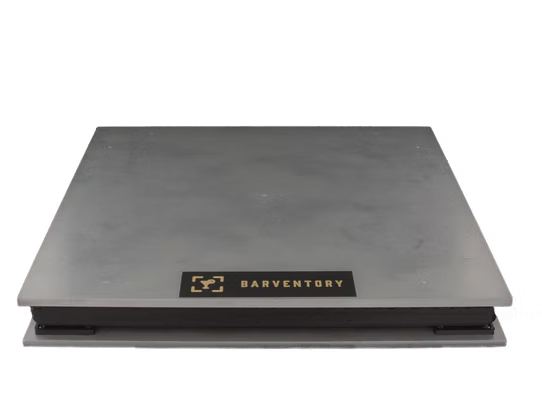
Bar Top Scale
Scan. Weigh. Track.
Scan the bottle, place it on the scale, and Barventory takes care of the rest.
- Fast bottle counts
- Automatic product identification
- Tens of thousands of preloaded products
- Accurate inventory measurements
- Real-time shopping lists
Keg Scale
Always Know What's in Your Keg.
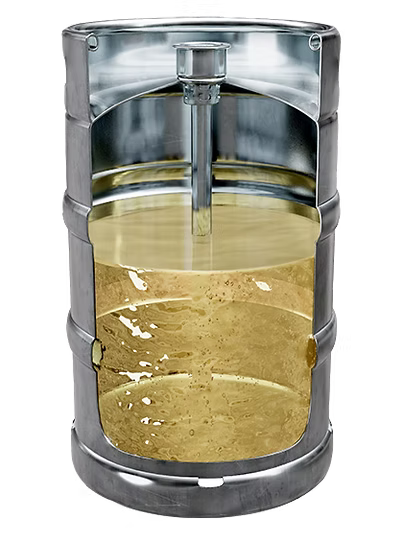
Place a Keg Scale under each keg and monitor draught inventory continuously in real time.
- Live keg volume
- Pours tracked
- Ounce-level accuracy
- Low-keg visibility
- No Foam Factor
Bar Top Scale — liquor inventory scale
Bottle Inventory in Three Simple Steps
- 01
Scan
Scan the bottle barcode.
- 02
Weigh
Place the bottle on the Bar Top Scale.
- 03
Track
Barventory identifies the bottle and records the remaining inventory.
No pen and paper. No guessing partial bottles. No spending hours updating spreadsheets.
The Bar Top Scale pairs a barcode scan with a precise weight reading, so bottle inventory becomes a repeatable process any team member can run — and every count lands in the Barventory platform.
Book a Barventory Demo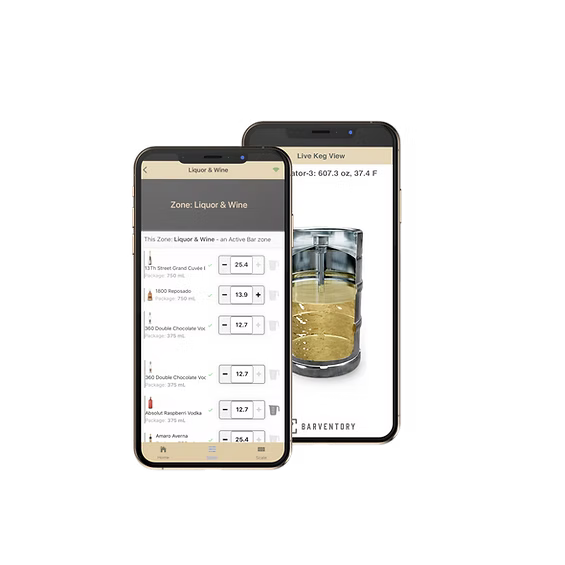
Real-time shopping list
Know What You Need Before You Run Out.
Every count you take with the Bar Top Scale feeds a live shopping list, so ordering starts from your actual bar inventory instead of a memory or a guess.
- What needs to be ordered, by vendor
- What is running low right now
- Current inventory levels as counts happen
Keg Scale — keg inventory system
See Into Every Keg.
For the first time, know exactly how much is left in your kegs and how much has been poured.
Keg Scale
Weighs the keg continuously
Wireless connection
Sends readings automatically
Barventory app + dashboard
Live draught inventory
Continuous monitoring
Each keg is monitored in real time.
Real-time keg levels
See how much beer remains right now.
Poured volume
Know how much has been poured.
Low-keg visibility
Catch a keg running low before it blows.
Easy setup
Set the scale up through the Barventory app.
Ounce-level accuracy
Accurate down to the ounce.
Can support cooler and freezer temperature monitoring and alerts.
Place the scale underneath the keg and leave it there — no lifting kegs for inventory counts, and unexpected or after-hours pours show up in your draught beer inventory.
See the Keg Scale in ActionThe No Foam Factor
Measure the Keg, Not the Foam.
Traditional flow-based tracking
Liquid + foam moving through the beer line
Flow-based systems can count foam moving through the line as product dispensed, creating a gap between measured flow and what is actually left in the keg.
Barventory Keg Scale
Keg sitting directly on the scale
Barventory measures the keg itself, giving you a direct view of what remains.
Accurate down to the ounce
Measure what's actually in the keg.
Book a DemoEverything connected
Your Inventory in One Place.
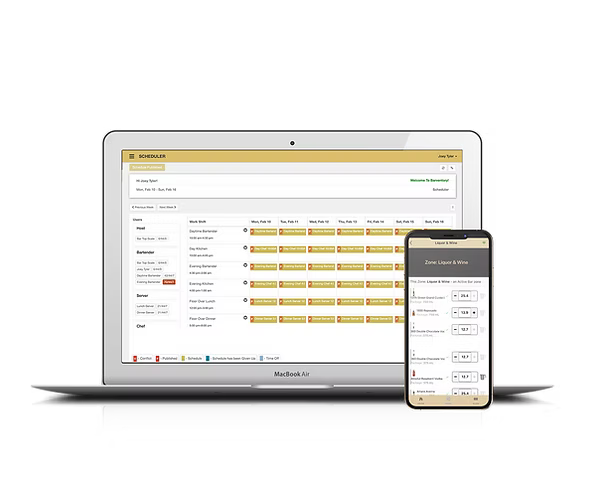
The Bar Top Scale and Keg Scale both connect into the Barventory platform — one bar inventory software for liquor, wine, and draught.
- Inventory tracking
- Consumption reporting
- Real-time stock levels
- Shopping lists
- Stock transfers
- Multiple inventory zones
- Multiple locations
- User permissions
- Receiving inventory
- Vendor management
- POS integration
- Mobile and cloud access
Bar POS inventory integration
Compare What You Used With What You Sold.
Barventory can connect inventory consumption with sales data, helping operators identify discrepancies and understand where beverage costs may be slipping.
- Overpouring
- Waste
- Unrecorded drinks
- Inventory discrepancies
- Process issues
Inventory used
0.0 L
POS sales
0.0 L
Spot the gap.
Built for Hospitality Operations of Every Size
Bars
Restaurants
Nightclubs
Hotels
Stadiums & Venues
Banquet Facilities
Catering & Events
Multi-Location Groups
From one location to hundreds of locations.
Spend Less Time Counting. Know More About Your Inventory.
- 01
Faster Inventory
Reduce the time spent manually counting bottles and kegs.
- 02
Better Visibility
Know what you have and what is running low.
- 03
More Accurate Counts
Replace visual estimates and manual measurements.
- 04
Smarter Ordering
Use current inventory to build your shopping list.
- 05
Better Cost Control
See how inventory usage compares with sales.
- 06
Operational Consistency
Use the same inventory process across teams and locations.
Before and After Barventory
Before Barventory
- Paper count sheets
- Spreadsheets
- Visual bottle estimates
- Lifting kegs
- Manual calculations
- Delayed inventory information
With Barventory
- Scan and weigh bottles
- Live keg monitoring
- Cloud inventory tracking
- Real-time shopping lists
- Consumption reporting
- Inventory visibility from anywhere
How it works
Get Up and Running Quickly
- 01
Set Up Your Inventory
Choose from tens of thousands of preloaded products.
- 02
Connect Your Hardware
Set up your Bar Top Scale and Keg Scales.
- 03
Start Counting and Tracking
Scan bottles and monitor kegs.
- 04
Use Your Data
Review inventory, ordering, consumption, and reporting.
What Operators Say
Space reserved for verified Barventory customer reviews.
“Customer quote placeholder — replace with a real Barventory review.”
Customer name
Business name
Location
“Customer quote placeholder — replace with a real Barventory review.”
Customer name
Business name
Location
“Customer quote placeholder — replace with a real Barventory review.”
Customer name
Business name
Location
“Customer quote placeholder — replace with a real Barventory review.”
Customer name
Business name
Location
“Customer quote placeholder — replace with a real Barventory review.”
Customer name
Business name
Location
Bar Inventory FAQs
Ready to Take Control of Your Bar Inventory?
See how Barventory can simplify bottle counts, monitor your kegs in real time, and give you a clearer picture of your beverage inventory.